We're excited to announce a big upgrade to our Leads and Active Project Pipelines – the ability to customize your Stage names!

We know that every real estate business is unique, and our pre-built workflows may not always fit your specific needs. That's why we've made it possible to tailor your Pipeline workflows and Stage names to match your exact business process.

How to Customize Your Stage Names:

It's incredibly easy to customize your Workflow:
image
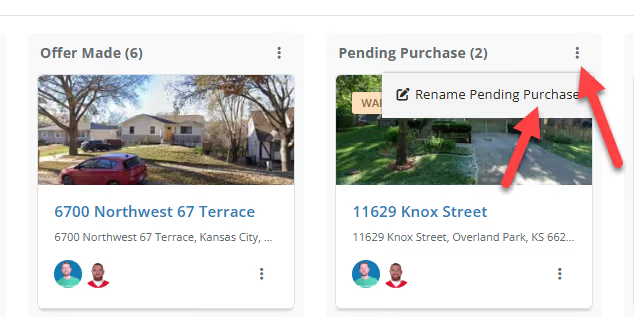
  1. Locate the three dots at the top right corner of each stage column.
  2. Click on the icon to access the "Edit Stage Name" option.
  3. Enter your desired stage name and hit save.

That's all there is to it! Your pipeline is now perfectly personalized to your workflow.

Benefits of a Customizable Workflow:

  • Flexibility: Whether you handle fix-and-flips, wholesale deals, or a mix of strategies, you can now create stage names that reflect your actual workflow.
  • Your Business, Your Way: FlipperForce adapts to you, not the other way around.
  • Clarity & Organization: A customized pipeline means no more confusion or mismatched stages. Your workflow is crystal clear at a glance.

We're always listening to your feedback and working to make FlipperForce the best it can be. Try out the new custom stage names today and let us know what you think!
Dave Robertson
September 4, 2024
5 min read
Our blog

Other Recent Blog Posts

New Features

Faster, More Reliable Photo and Receipt Uploads in the Mobile App

The FlipperForce Field mobile app now uploads photos and receipts faster and more reliably on iOS and Android. A new My Recent Uploads inbox lets you track progress, retry failed items, and run multiple upload batches at once.
Dave Robertson
September 22, 2026
5 min read
New Features

Dark Mode Is Here on Web and Mobile

FlipperForce now has a full dark theme across the web app and the FlipperForce Field mobile app. Choose Light, Dark, or System to match how and where you work.
Dave Robertson
September 22, 2026
5 min read
New Features

Your Work, Front and Center in the Daily and Weekly Digest

The Daily and Weekly Digest emails summarize tasks, schedules, and events across your projects. Both now lead with a Work Assigned to Me section, so you see your own overdue, due today, and upcoming work before everything else in the workspace.
Dave Robertson
August 27, 2026
5 min read
New Features

AI Receipt Analyzer Now Supports Word Documents

The AI Receipt Analyzer now accepts .doc and .docx files. Upload a Word invoice from a contractor or vendor straight into your receipts and analyze it without converting it to a PDF first.
Dave Robertson
August 24, 2026
5 min read
New Features

New Material Catalog API Endpoint

Read, create, and update materials in your catalog through the Public API, so you can import past purchase history and refresh your pricing without manual data entry.
Dave Robertson
August 22, 2026
5 min read
New Features

Search, Filter and Complete Tasks Faster

Search your tasks by name, notes, project, or assignee, filter by status and priority, and mark tasks complete right from the table.
Dave Robertson
August 19, 2026
5 min read

Ready to Take Action?

Sign up for a free trial and join over 3,000 house flippers and real estate investors that have taken their business to the next level!