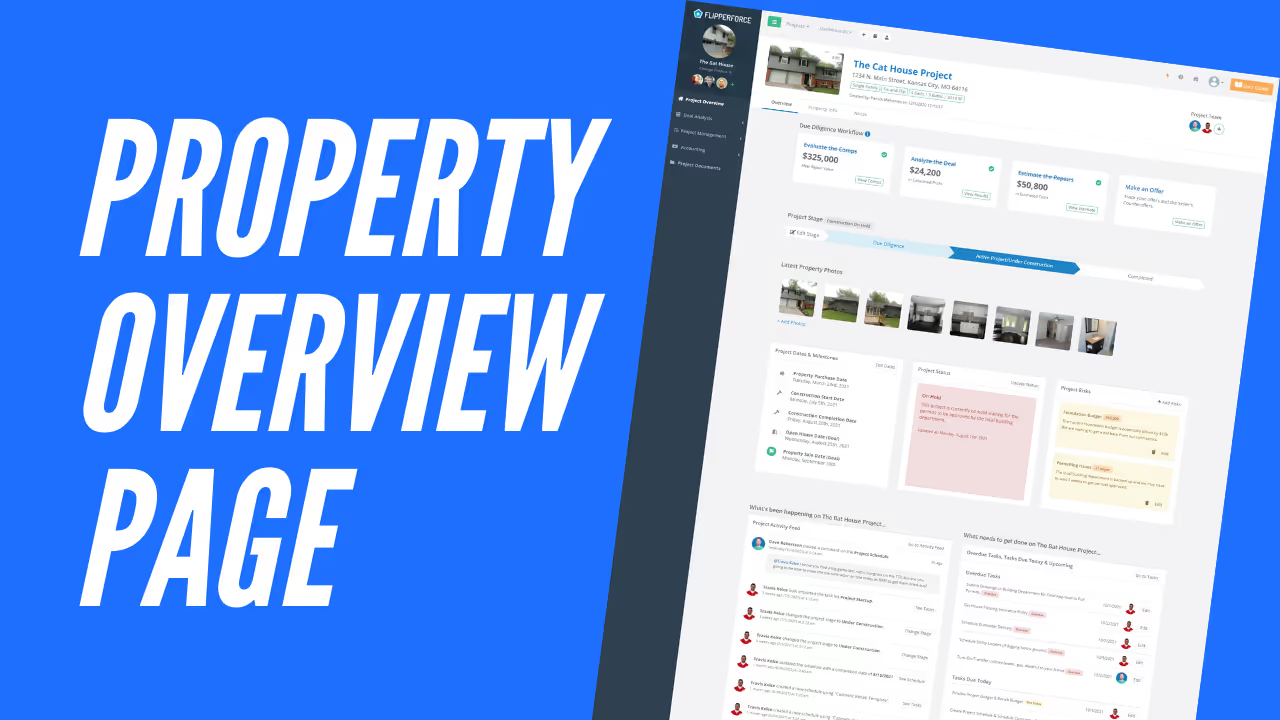
We just launched our new Property Overview page which will be the main project "hub" to see all of the important information about the project stage, status, milestones and things that you need to get done on your project.
New Project Overview Screenshot

Workflow
The project 'workflow' cards will help guide you through the steps you need to take during each stage of your flip.
For example, in the Due Diligence Stage you need to Analyze the Deal and Estimate the Repair Costs to evaluate the Maximum Purchase Price you should offer for the property.

Project Stage Widget
The Project Stage Widget will help you visually identify the stage your projects are in so you can track the project's progress.

Key Dates & Milestones Widget
The Milestones Widget can help you keep track of all of the major project dates and milestones like the purchase date, construction dates & sale dates.

Project Status Widget
The Project Status Widget can provide at-a-glance insight about the overall project progress and what’s happening on the project.

Project Risks
The Project Risks widget can be used to document the major project risks and concerns that could impact the project budget and schedule.

Future Improvements
We are still working on a few more widgets that we will be adding in the next few weeks to help you better manage your project photos and outstanding tasks so you can truly have a pulse on everything that's happening and needs to get done on your project.
Project Photos Widget
The Property Photos Widget will tie into our new Project Photo Log which will be a new tool dedicated to managing all of your property photos. The Photos widget will allow you to see a quick pictorial overview of the project progress.

Project Tasks Widget
We are also working on a new 'Tasks' widget which will provide an overall, at-a-glance view of all tasks that are overdue and due soon on your project.