With the launch of our new Portfolio Table view, you can now create an overall Portfolio report that showcases all of your successfully completed projects to help you build massive credibility and secure funding for your deals!

Why Proof of Experience Matters?

When you approach lenders and business partners, one of the first things they look for is experience. As a house flipper, your track record is key. That's why we created this dedicated report – to showcase your accomplishments and prove you're a qualified, experienced flipper they can trust.

How it Works:

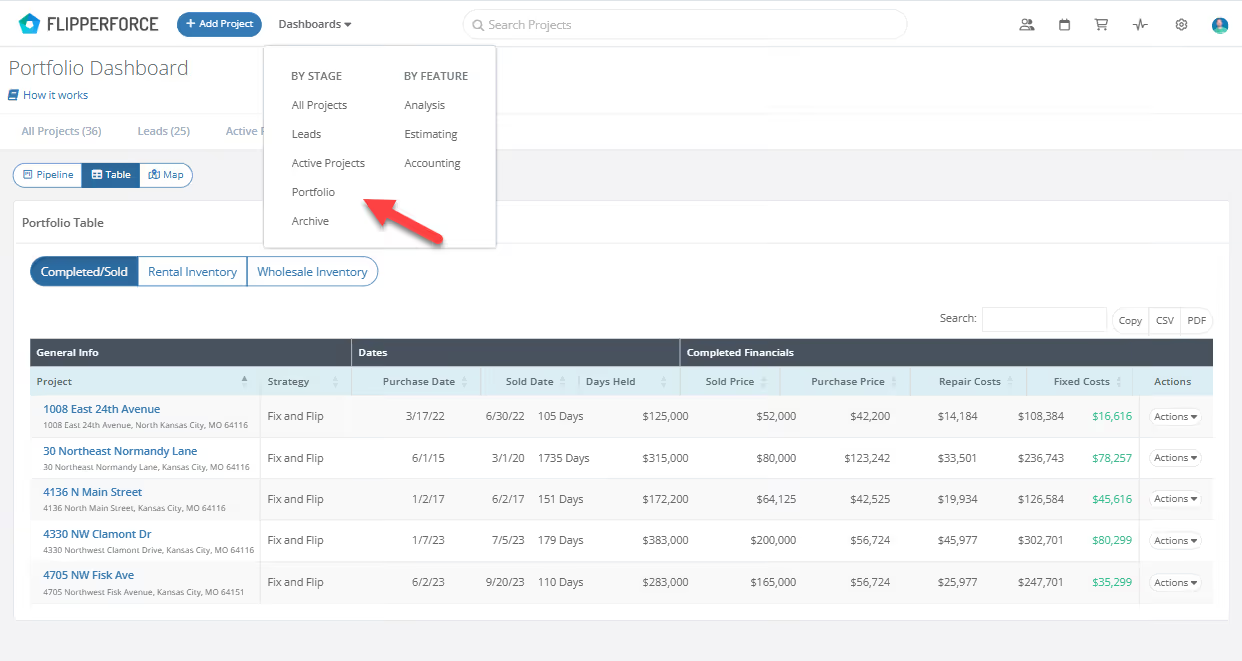
Head over to your revamped Portfolio Dashboard where you will find your "Completed/Sold" table which showcases all of your successfully completed projects!
image

What's Included in the Portfolio Table?

This Portfolio Table provides a comprehensive overview of your successfully completed projects, including:

  • List of Completed/Sold Projects: See all your flipping wins in one place.
  • Project Details: Get specifics on purchase dates, completion dates, and holding period for each project.
  • Financial Breakdown: Dive deeper with details like purchase price, renovation costs, and your final profit for each flip.

Sharing with your Business Partners and Lenders!

You can easily share your Portfolio Report using a PDF or CSV spreadsheet:

  • Print a PDF: This is perfect for a professional, hard copy to present to lenders or partners.
  • CSV Spreadsheet: Download a CSV spreadsheet file that you can use to create a custom portfolio report.

Get Funded Faster:

With your Portfolio Report in hand, you can confidently demonstrate your expertise and secure funding for your next project with greater ease.


Dave Robertson
June 17, 2024
5 min read
Our blog

Other Recent Blog Posts

New Features

New Bulk Company Importer

Our new AI-powered Company Importer makes it easy to import your company data, so you can quickly assign your vendors and contractors to project schedules, expenses, and bids.
Dave Robertson
March 9, 2026
5 min read
New Features

Enhanced "Type to Search" Dropdowns for Expenses

Easily type-to-search and select the Account, Company and Category without touching your mouse.
Dave Robertson
February 27, 2026
5 min read
New Features

Enhanced Date Range Filters & Accounting Controls

We've introduced new Date Range and Accounting filters across the Expense Tracker and reports to give you more flexibility and control over your project spending data.
Dave Robertson
February 25, 2026
5 min read
New Features

New Transaction Reports for Simplified Reconciliation

Learn how our new Global and Project Transaction Reports simplify reconciliation by allowing you to track and filter every expense across your entire portfolio in one master list.
Dave Robertson
February 20, 2026
5 min read
New Features

New Transaction Grouping for Expenses

Easily reconcile your project spending by grouping individual expenses into searchable transaction totals that match your bank statements.
Dave Robertson
February 16, 2026
5 min read
General

FlipperForce Named One of the Best BRRRR Analysis Tools for 2026

FlipperForce was recently named a top BRRRR analysis tool for our ability to simplify both complex deal analysis and the day-to-day management of rehab projects.
Dave Robertson
February 13, 2026
5 min read

Ready to Take Action?

Sign up for a free trial and join over 1,000 house flippers and real estate investors that have taken their business to the next level!